Receipts for small teams · Canada
Every receipt captured, with its purpose, before anyone forgets. Your team snaps receipts the moment they spend and writes one line about what they were for. ReceiptCue reads the rest and keeps everything organized, so nothing is missing when your accountant asks.
Ten-second capture on any phone — no app store, no bank login Purpose, business line, and who paid, recorded at capture Tax-ready records your accountant can review and export Free to start. Works for one person or a team of ten.
Receipt captured
Merchant, date, total, and tax read automatically
Purpose noted
"Printer paper for the daycare" — written while it was fresh
Ready for your accountant
Categories, GST/HST, and export in one place
Real product preview
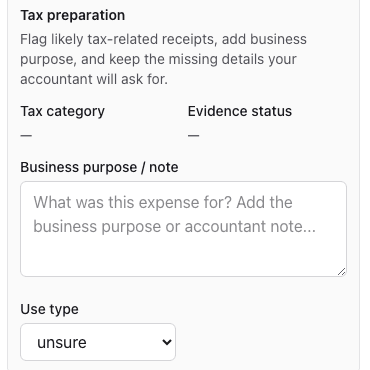
One receipt, read by OCR, tagged with its purpose, ready for review. This is the screen your team and your accountant share.
Nothing left to reconstruct
Know what was bought, why, by whom, and where the proof lives — months later, in one click.
What changes
Three things stop going wrong Small teams lose receipts, forget what they were for, and find out in March. ReceiptCue is built around those three moments.
Receipts stop going missing
Capture on the spot from any phone, so the receipt never has to survive a pocket, a car, or a desk.
Nobody has to remember what it was for
One line of purpose at capture beats an hour of guessing at tax time.
Your accountant gets records, not a shoebox
Categorized, with GST/HST and the original image attached, exportable any time.
You see who is behind
Owners see what came in, what needs review, and which receipts are still missing a purpose.
When capture takes ten seconds and the purpose is written on the spot, tax season becomes an export instead of a reconstruction.
See the workflow Why this feels different
Not just a receipt scanner. Scanning is the easy part. ReceiptCue is built around the moment a receipt gets lost or forgotten — and closes it.
Capture takes ten seconds Camera, file, or PDF from any phone. OCR reads the merchant, date, total, and tax in the background.
Purpose is written while it's fresh Three quick questions at capture: what was it for, which part of the business, who paid. No tax vocabulary required.
Follow-through is built in Receipts missing a purpose are flagged and the right person is reminded, so the owner is not the one chasing.
How it works
How it works Capture receipts in seconds, answer three quick questions, and let owners and accountants review, categorize, and export tax-ready records.
01
Step 1
Snap or upload Phone camera, PDF, or image. OCR reads merchant, date, total, and tax in the background.
Works on any phone as an installable web app — nothing to download from an app store.
Step 2
Answer three quick questions What was it for? Which part of the business? Who paid — the company card or you?
Ten seconds. Employees never see a tax category.
Step 3
Review and hand off Owners and accountants review, categorize, and export tax-ready records. Missing purposes are flagged and chased for you.
Export CSV and receipt images any time. Accountants can get read-only access.
ReceiptCue organizes records. Tax treatment still depends on your situation and your accountant's judgment.
Who it's for
Built for small teams where more than one person spends ReceiptCue is strongest when several people buy things, one person is responsible for the records, and an accountant needs them clean.
Small companies with a few spenders Three to ten people buy supplies, meals, and software. The owner wants every receipt captured with its purpose without becoming the person who chases.
Self-employed and sole proprietors Keep deductible receipts organized through the year so tax season is an export, not a reconstruction.
Bookkeepers and tax preparers Give clients a place to drop receipts with purposes attached, see who is behind, and pull tax-ready records without the chasing.
Canada guides
Browse ReceiptCue's Canada receipt guides by filing and record-keeping situation Start with personal, self-employed, or corporation guidance, then move into the guide that best fits the records you need to keep ready.
Focused guides
Start with the receipt workflow that best matches what you need to keep ready These are the strongest starting points for Canada tax, reimbursement, and accountant handoff workflows.
Organize receipts for tax season See the tax-ready workflow for keeping deduction proof organized before filing season gets busy.
Organize receipts for reimbursements See the reimbursement-ready workflow for keeping proof usable from purchase to submission.
Organize receipts for freelancers Keep self-employed receipt proof ready for Canada tax season and accountant review instead of rebuilding it later.
Organize receipts for small business Keep owner, team, and accountant receipt records aligned before month-end and tax-season cleanup starts.
Organize receipts before you hand them to your accountant Keep receipt files, key fields, and short explanations together before accountant review starts.
Helpful resources
Keep a few checklists and comparisons close while you shape your process These checklist and comparison pages help reduce last-minute back-and-forth before filing, reimbursement submission, or accountant handoff.
Receipt organizer vs spreadsheet See where spreadsheets help, where they drift away from the original proof, and where a receipt workflow stays cleaner later.
Receipt organizer vs folders See where folders preserve files, where they lose context, and why later review still becomes cleanup work.
Receipt checklist for Canada tax season Use a short checklist to keep tax-season receipt proof cleaner before filing and accountant review begin.
Reimbursement receipt checklist Use a short checklist to keep reimbursement proof cleaner before submission and follow-up questions begin.
One workflow
From capture to hand-off in one workflow ReceiptCue connects the moment someone pays with the moment your accountant needs the record.
Capture
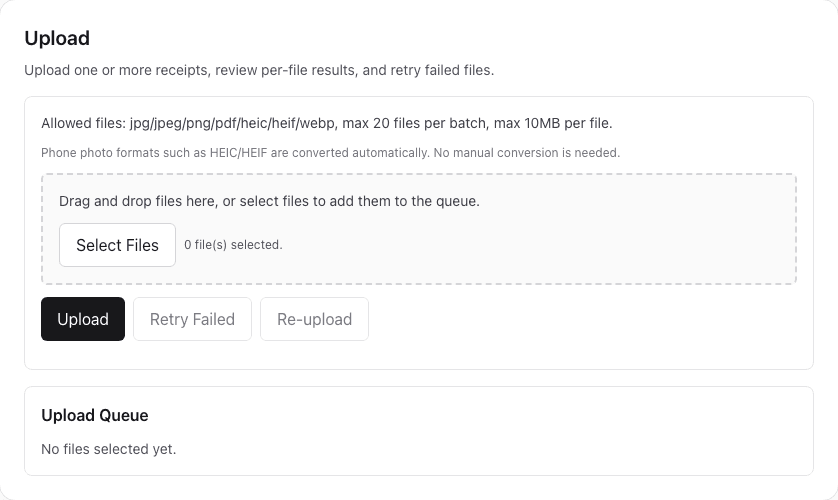
Get the receipt in while it is still in someone's hand. Drag, drop, or snap up to twenty receipts at once. Phone photo formats are converted automatically.
Purpose, business line, and who paid asked on the spot Failed files can be retried without re-entering anything Capture once, while the purchase is still recent.
Review
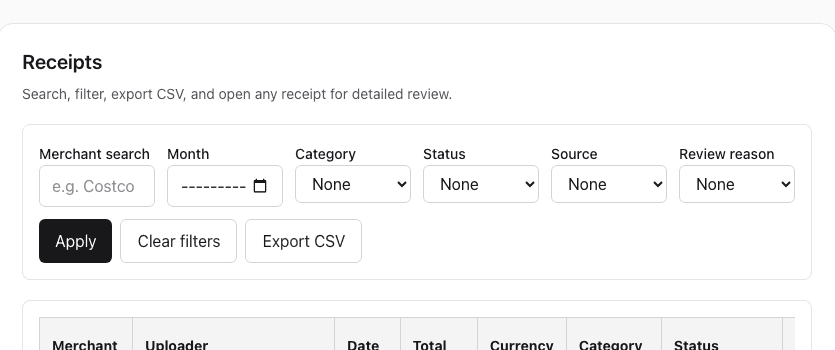
See everything that came in, and what still needs a look. Search by merchant, filter by month, status, or category, and open any receipt for detailed review.
Receipts that need review or are missing a purpose are one filter away OCR is the first pass; a person confirms before anyone relies on it One list for the owner, the team, and the accountant.
Hand off
Give your accountant records, not a folder of photos. Every receipt carries its purpose, category, and GST/HST. Export CSV and images any time, or give your accountant read-only access.
Purpose written by the person who spent, not guessed later Accountant role sees everything, changes nothing The record your accountant actually needs.
Why not a folder or spreadsheet?
Folders keep files. Spreadsheets keep numbers. Neither remembers why. The problem is not storage. It is that the purpose, the proof, and the person who knows are in three different places by tax time.
What breaks Folder Spreadsheet ReceiptCue Capture speed Save files somewhere and hope you rename them later. Track the purchase separately from the actual receipt image. Capture the receipt and keep the file attached to the record from the start. Search and retrieval Relies on memory, filenames, and manual sorting. Relies on manual row hygiene and matching cells back to files. Keeps the proof and key details together in one searchable workflow. Purpose and context Nobody remembers what the receipt was for by tax time. A notes column, if anyone fills it in. Purpose is captured in ten seconds, by the person who spent, right when the receipt is. Shared review Hard to know who checked what. Easy to edit, harder to trust. Supports shared visibility and accountant-friendly review across workspaces. Who is behind You find out in March. Only if someone reconciles by hand every month. Missing receipts and purposes are flagged, and the right person is reminded.
Proof of value
The first win is the first month nothing goes missing Most teams feel ReceiptCue the first time month-end takes ten minutes instead of a group chat full of "what was this for?"
Right after purchase Ten seconds: snap, write what it was for, pick who paid. Done.
At month end The owner sees what came in, what needs review, and who still owes a receipt or a purpose.
At tax time Export categorized records with GST/HST and images, or let your accountant pull them directly.
The value is not the scan. It is never having to reconstruct what happened.
10 sec
Per receipt, on a phone
3 questions
Purpose, business line, who paid
0 bank logins
Extra logins required
What improves first
Receipt captured while details were fresh
Proof preserved Purpose written by the person who spent
No more guessing Owner sees who is behind before month end
Nothing to chase in March What shifts next
Capture
Ten seconds on the spot, from any phone.
Review
Owners and accountants confirm categories and GST/HST.
Hand off
Export tax-ready records with images, any time.
Trust the workflow
Built to feel trustworthy fast Start with the real problem — receipts that go missing and purposes nobody remembers — and see the real product from the first screen.
No credit card required Create an account and try the flow before you pay anything.
No bank login Start from the receipts you already have. Nothing to connect.
Real product screens The screens on this page are the actual upload, receipts, and review screens.
Helpful at tax time Records stay categorized and exportable. Deductibility still depends on your situation and local rules.
Trust and control
Keep the workflow helpful without creating new risk. Uploading receipts is sensitive work. ReceiptCue should lower cleanup and uncertainty, not add more of it.
No bank login required You start with receipts you already have. No bank account to connect.
You control uploaded receipts Keep the original proof attached to your record instead of handing control of the file to another system.
Export and deletion supported Move your records out when you need to, and keep account lifecycle controls available when your workflow changes.
OCR is review-first ReceiptCue uses OCR as the first pass, then keeps the important fields visible for review before you trust them later.
Tax flags are informational ReceiptCue helps surface record-keeping questions, but it does not replace tax, legal, or accounting advice.
Built for Canadian small businesses GST/HST on every receipt, CRA-friendly record keeping, and accountant hand-off instead of generic receipt storage.
Pricing
Pricing for one person or a small team. Start free. Pay when your team relies on it every month.
Start here
Free Free
Try it on your own receipts.
Upload, answer the three questions, and see the record your accountant would see.
Upload and review a small set of receipts each month Purpose, business line, and who paid on every receipt Good for building the habit before your team joins Best value
Pro CAD 7.99/mo
For one person who wants everything kept.
Best for self-employed people and sole proprietors who want the full year organized and exportable.
Unlimited history and CSV export with receipt images Reminders for receipts still missing a purpose Invite your accountant with read-only access For teams
Business CAD 27.99/mo
For companies where several people spend.
Up to ten teammates capture receipts into one workspace. Owners and accountants review, categorize, and export.
Shared workspace with owner, employee, and accountant roles See who is behind and remind them automatically Ten seats included, more at CAD 4.99 each For bookkeepers
Practice From CAD 79/mo
One portal for all your clients' receipts.
Give each client a place to drop receipts with purposes attached, see who is behind, and pull tax-ready records without chasing.
Up to 20 client workspaces; larger plans available Per-client completeness view and reminders Founding-member pricing locked for the first ten firms Start free. Upgrade when your team relies on it. Bookkeepers: book a demo and we will set up your first clients together.
Start today
Start with one receipt, today Upload it, write one line about what it was for, and see exactly what your accountant will see.
No credit card required. No bank login.
10-second capture
No credit card required
No bank login
FAQ
Questions before you start? How long does it take to capture a receipt? About ten seconds on a phone: snap or upload, write one line about what it was for, pick the business line and who paid. OCR reads the merchant, date, total, and tax in the background.
Do my employees need to know tax categories? No. Employees only answer plain-language questions. Owners and accountants assign tax categories later, and ReceiptCue suggests them from the purposes your team has already written.
Is ReceiptCue free to start? Yes. Start free with your own receipts and upgrade when you want unlimited history, export, reminders, or a shared team workspace.
Can my accountant see the receipts? Yes. Invite your accountant with a read-only role: they can review, categorize, and export, but they cannot change your team's records.
Do you connect to my bank? No. ReceiptCue never asks for bank credentials. You start from the receipts themselves, and you stay in control of what is uploaded, exported, or deleted.
Can ReceiptCue tell me which expenses are deductible? It keeps records categorized, complete, and easy to review, which is what your accountant needs to decide. Whether an expense is deductible depends on your situation and Canadian tax rules.