
Real product preview
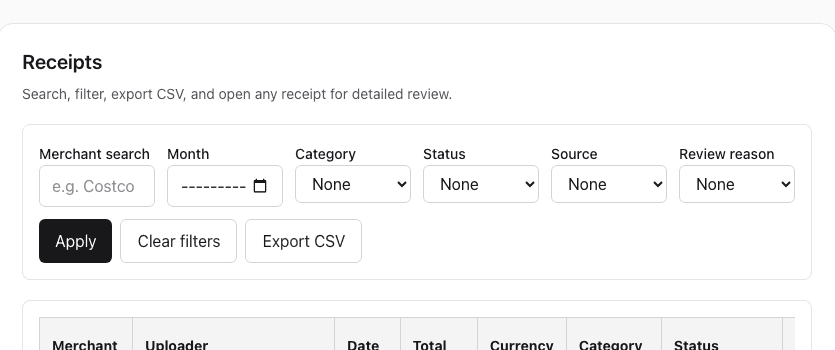
The same receipts list your clients see — searchable, filterable, exportable — with the accountant role that can review everything and change nothing.
For bookkeepers and tax preparers
Your clients snap receipts on their phone and write one line about what each was for. You see every client's completeness in one place and export tax-ready records when you need them.
Founder-led setup: we onboard your first clients with you.
Real product preview
The same receipts list your clients see — searchable, filterable, exportable — with the accountant role that can review everything and change nothing.
The problem
Shows up in March with a bag of paper and no memory of what half of it was for. You spend billable hours sorting and guessing.
Three to ten people spend on a company card. Receipts live in five phones and one WhatsApp group, and the owner is the one you have to chase.
Too small for QuickBooks or Xero, too busy for a spreadsheet. They need a place to drop receipts that costs less than an hour of your time.
How it works
Step 1
Clients and their staff get an upload-only role. You keep the accountant role across every workspace you own.
Step 2
What was it for, which part of the business, who paid. Ten seconds on a phone. OCR reads merchant, date, total, and tax.
Step 3
See who is behind, assign tax categories with GST/HST, and export CSV plus receipt images for your own software.
Practice pricing
Flat monthly pricing per practice, not per client seat. Larger plans for 50 clients and up. Annual billing pays for ten months.
We set up your first clients with you on the call.
FAQ
Sole proprietors, small corporations with a few people spending, and anyone who currently hands you a shoebox. If a client already runs QuickBooks or Xero with bank feeds, they may not need it.
No. ReceiptCue is the intake layer, not a ledger. You export categorized CSV with GST/HST and receipt images into whatever you already use.
By practice, not by client: from CAD 79 a month for up to 20 client workspaces. Book a demo and we will walk through the plan that fits your client count.
Yes. The app, reminders, and this site are available in English and Chinese, so a Chinese-speaking client and an English-speaking accountant can share one workspace.